
Install WoHo Agent
Это содержимое пока не доступно на вашем языке.
The agent (woho-client) runs as a service on the managed machine and keeps one outbound TLS connection to the server on port 9000. Nothing listens on the machine.
| Platform | Binary |
|---|---|
| Linux x86-64 | Published; kernel 3.10+ |
| Linux ARM64, Windows | Build from source |
-
Generate a key in the panel
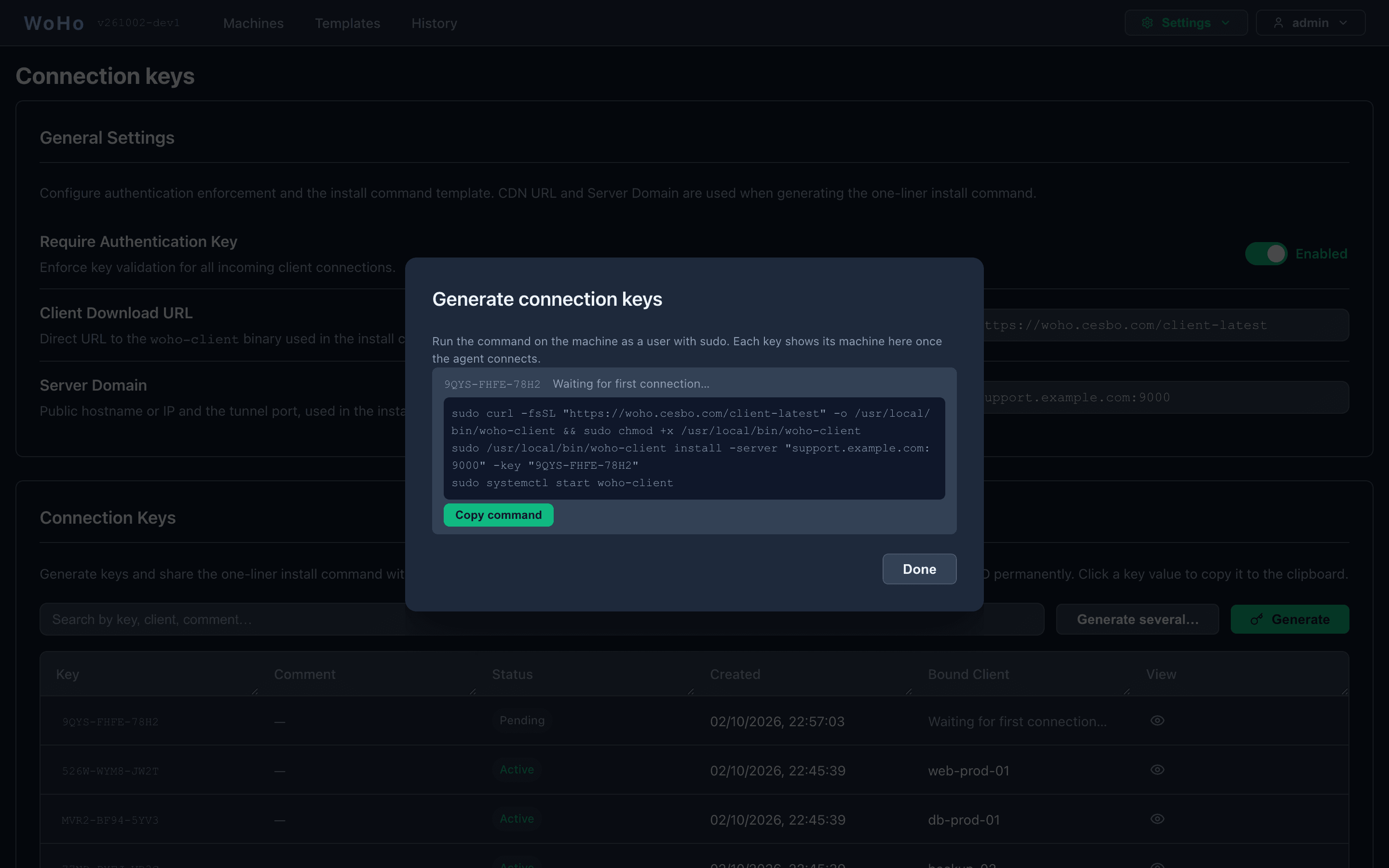
Open Settings → Connection keys and click Generate. The dialog shows the install command for the new key.
-
Run the command on the machine as a user with sudo
Terminal window sudo curl -fsSL "https://woho.cesbo.com/client-latest" -o /usr/local/bin/woho-client && sudo chmod +x /usr/local/bin/woho-clientsudo /usr/local/bin/woho-client install -server "woho.example.com:9000" -key "XXXX-XXXX-XXXX"sudo systemctl start woho-clientinstallwrites/etc/woho/woho-client.yaml(root-only, mode0600), registers the systemd unitwoho-clientwith-configas its only argument, and enables it. -
Check
Terminal window systemctl status woho-clientThe machine appears on the Machines page within seconds, and its key shows it under Bound Client.
Transport options
Section titled “Transport options”The install command works as is when the server’s certificate is publicly trusted for the hostname in -server. Otherwise add one flag:
| Server | Add |
|---|---|
| Private or self-signed certificate, or connecting by IP | -pin sha256//BASE64 — the SPKI pin printed by woho config check and in the server’s startup log |
tunnel_insecure: true (local trial) | -insecure |
Never combine -pin with -insecure. The machine’s name in the panel is -name "web-prod-01"; the default is its hostname.
Service management
Section titled “Service management”journalctl -u woho-client -f # logssystemctl restart woho-clientsystemctl stop woho-clientsudo woho-client uninstall # removes the unit, binary and config; keeps client_idChanging a setting
Section titled “Changing a setting”Edit /etc/woho/woho-client.yaml and restart, or rerun install with only the flag you want changed — it keeps the rest:
sudo woho-client install -name "web-prod-01"sudo systemctl restart woho-clientSee Agent Configuration for the schema, files_root, notify_console and every flag.
Windows
Section titled “Windows”No Windows binary is published. Build it from a source checkout, then run the remaining commands in an Administrator PowerShell:
$env:CGO_ENABLED = "0"; $env:GOOS = "windows"; $env:GOARCH = "amd64"go build -o C:\Temp\woho-client.exe ./cmd/client
C:\Temp\woho-client.exe install -server woho.example.com:9000 -name "Windows-PC-01" -key XXXX-XXXX-XXXXsc.exe start woho-clientsc.exe query woho-client
The Windows service keeps its settings on the service command line; there is no config file on Windows. To change one, rerun install with the flag. Add -insecure if the server runs with tunnel_insecure.
Updating
Section titled “Updating”From the panel. A machine whose agent is older than the server shows Update available on the Machines page and an Update agent button in its workspace header and detail panel. The agent downloads the binary from the Client Download URL set on the Connection keys page, checks the .sha256 published beside it, and restarts; the panel follows it through Downloading → Restarting → Reconnected. The button appears for a Linux agent installed as the service and new enough to support it. Agents installed before that are updated by hand once.
By hand.
systemctl stop woho-clientcurl -Lo /usr/local/bin/woho-client https://woho.cesbo.com/client-latestchmod +x /usr/local/bin/woho-clientsystemctl start woho-clientThe config file and client_id are kept, so the machine keeps its identity and its key.